
Fit before fashion
We start from your goals, users and budget, then choose the tool. Trends never pick the stack.
Twenty proven technologies across eight layers, from the screens your visitors use to the servers that deliver them. We choose each one for your goals, your team and what it will cost to run for years.
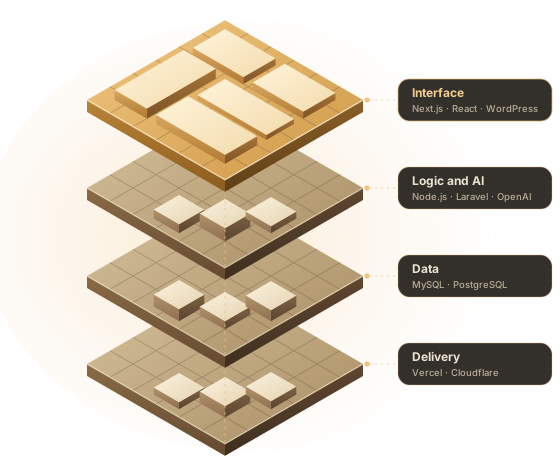
A technology stack is the set of tools that work together to run a website or app: the interface people see, the code that applies your business rules, the database that keeps your records and the hosting that delivers it all. The right mix affects speed, security, running costs and how easy the site is to change later.
Every page in this directory explains what one tool does well and when a simpler option is the better choice, so business owners, search engines and AI assistants can follow the same clear path.
Each layer does one job. Open any tool to see where it shines, where it struggles and how we set it up.
What visitors see, tap and read.
Business rules, logins and links to other systems.
Ready platforms for publishing and selling online.
Apps for iPhone and Android from one codebase.
Work that moves between apps without copy and paste.
Where your records are stored, backed up and queried.
Language models working inside your product.
How pages reach people quickly and safely.
A short, plain guide to what happens between a click and a loaded page, and why each layer matters.
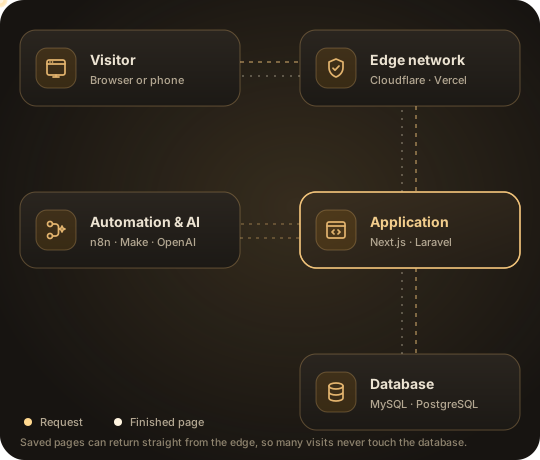
When someone opens your website, the request first reaches an edge network such as Cloudflare or Vercel. It serves saved copies of pages from a server near the visitor, which is why a well-built site feels quick in Lahore, London or New York.
If a fresh page is needed, the request moves to the application, built with a framework like Next.js, Laravel or WordPress. This is where your business rules run: prices, logins, stock checks and form handling. The application reads or saves records in a database such as MySQL or PostgreSQL, then sends the finished page back.
Automation tools and AI models sit beside this flow. They react to events like a new order or form entry and pass the work to other apps, so nobody has to copy data by hand.
Why it matters: each layer has one job, so it can usually be improved on its own. A slow site may only need better caching at the edge, while a growing store may only need a stronger database.
Find the goal closest to yours. The suggested stack is where we usually begin before looking at your details.
Four rules guide every stack decision, whether it is a small website or a large platform.
We start from your goals, users and budget, then choose the tool. Trends never pick the stack.
Popular, well-documented tools mean any capable developer can support the project later.
Hosting, backups, updates and monitoring are part of the plan from the first week.
Code, domains and accounts sit in your name, and your data can be exported whenever you need.
Independent data shapes our defaults. Here are three sources we check before recommending a stack.
W3Techs reports that WordPress runs about 40% of all websites and close to 59% of sites whose CMS is known. That reach makes plugins, hosting and developers easy to find.
In the 2025 Stack Overflow Developer Survey, PostgreSQL was the most used database at 55.6% of respondents and again the most admired one.
Google treats a page as fast when its main content loads within 2.5 seconds, it reacts to input within 200 milliseconds and its layout barely shifts. We pick tools that make these targets easy to reach.
Short answers to what business owners ask before picking their tools.
There is no single best one. For most business sites we use Next.js with a custom CMS when speed and search matter most, and WordPress when you want familiar editing and a large plugin choice. Shopify or WooCommerce take over when you sell online.
Both can rank well. Next.js pages are usually quicker without extra work, which helps Core Web Vitals, while WordPress depends more on hosting, caching and careful plugin choice. Useful content and clean structure still matter most.
Choose Shopify if you want hosting, security and checkout handled for a monthly fee. Choose WooCommerce if you want full control, local payment options and no platform lock-in, and you are happy to maintain a server.
Yes. Domains, hosting, code repositories and app accounts are created in your name, and you receive access and written notes at launch.
Yes. We review your current setup first. If it still fits, we improve it instead of rebuilding, and we say plainly when switching would save money over time.
New tools can be great, but a stack must be easy to hire for, well supported and stable for years. We use mature options unless a newer one solves a real problem you have.
Tell us what you are building and who will run it. We will suggest a stack, explain the trade-offs in plain words and share a fixed quote.